Have you been on the Family Tree Maker software message board on Ancestry recently? If so, you’ve see all the posts about sync problems like I have. You’ll also have seen long-time FTM user, FTM guru Russ Worthington on there helping people with great advice and clear answers. Well, I’ve been wanting to help out on this matter too so I asked Russ if I could record an interview with him about TreeSync and share it with you, and he enthusiastically agreed. So we talked in preparation and he told me something the blew my mind!
[Read more…] about Trouble-Free FTM TreeSync Secrets Revealed
Tutorial
Video Guide to Using PC Genealogy Software on Mac
You can run PC genealogy applications (like Family Tree Maker 2012 and RootsMagic) on your Mac, even if it’s just as a supplement to your primary Mac genealogy software.
There are features in the best Windows genealogy software that aren’t in Mac offerings. Family Tree Maker 2012’s ability to synchronize with Ancestry.com and RootsMagic’s full-featured narrative reports spring to mind.
There are essentially three approaches to running PC software:
- Run Windows on your Mac in a “virtual PC”
- Make your Mac boot into either OS X or Windows using BootCamp
- Use a piece of software to do for your genealogy software what Windows would (Windows emulation)
[Read more…] about Video Guide to Using PC Genealogy Software on Mac
Splitting a Family Tree with Family Tree Maker, Part 2
Ben recently wrote about his frustrations with splitting a tree in Family Tree Maker for Mac 2 (FTMM2). I needed to do this for my own tree, so I set about finding the best way to do it. I recently prepared a family tree for my stepmother-in-law and, silly me, included it in my primary file. After reading Ben’s post, I became concerned that splitting that branch from my file would be impossible. As Ben said, many steps are involved, but it’s not impossible. [Read more…] about Splitting a Family Tree with Family Tree Maker, Part 2
Adding and Changing a Portrait in Family Tree Maker for Mac 2
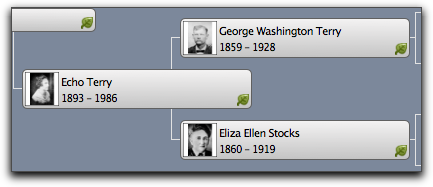 Adding and changing a portrait in Family Tree Maker for Mac 2 (2012) is one of the activities that isn’t very Mac-like. Mac users expect intuitive control of an app. The intuitive action here is to drag and drop the image onto the portrait in the pedigree view or editing panel. Alas, it doesn’t work that way yet.
Having pictures of my ancestors in my pedigree view helps me connect to my main purpose while doing family history research: to revive and keep their stories alive. Like you, I do this by discovering and crafting stories about them that my family members are eager to hear and share. Their faces help create a sense of familiarity.
[Read more…] about Adding and Changing a Portrait in Family Tree Maker for Mac 2
Migrating Family Tree Maker 2012 and ‘for Mac 2 Tree Files
The Family Tree Maker for Mac 2 (FTMM2) CD includes a Windows program for converting family tree files between Family Tree Maker (including 2012) and FTMM2.
This is a must-have utility if you want to:
- share FTM files
- move between a PC version of FTM and a Mac version
- keep your FTM 2012 and FTMM2 synchronized (e.g. link FTMM2 with an Ancestry member tree and use FTM 2012 on the same tree, albeit unlinked)
No matter your reason, using the migration utility is better than exporting and importing using GEDCOM. That’s not giving it enough credit! It’s far better than GEDCOM for this purpose. That’s because it doesn’t have to handle all the scenarios GEDCOM does.
[Read more…] about Migrating Family Tree Maker 2012 and ‘for Mac 2 Tree Files