Have you ever wanted to see just what the relationship is between two people in your Reunion family file? Better yet, how about seeing the connections in a chart?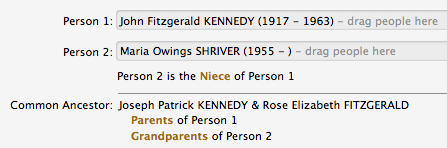
Reunion 10 let’s you do both with people who are related by blood and those related by marriage. Here’s how to do it:
- Choose Find in the Navbar—the Find panel appears
- Select two people by dragging and dropping them from a sidebar or list into the spots for Person 1 and Person 2
- When both spots are occupied, click the Find Relationship button
- You can click the go buttons to open the person in the family view
- You can create a descendant chart that connects the two people by clicking the Create Chart button
My ‘Reunion’ program suddenly, no longer shows the family relation between myself (source) and anyone else on the program. However, my wife, which is the exact same program, does still show her relationships. Do not see the ‘NavBar’, ‘Tool’s’ or any of the other buttons they talk about. (I think mine is an older program. After our family name, on the very top center of the program, is simply 10). What do you suggest/reccomend to again show the relationships between all persons and ‘source’ person? Thank you.
Claudette’s Dad and Albert’s Dad are first cousins. What relationship are Claudette and Albert to each other?