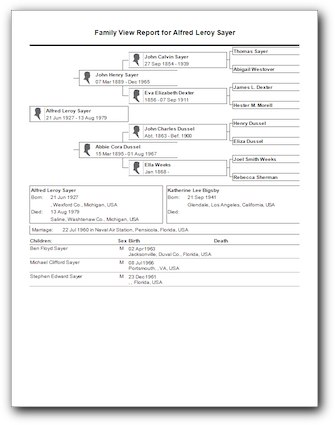
 Want a Family Tree Maker 2012 family group sheet with a pedigree chart at the top instead of a family picture? Your wish just came true.
What You Need to Know
Like the family group sheet report on which it is based, it has the option to included children from other unions[1], lines for extra children[2], individual thumbnail images, and preparer information.
Unfortunately, it doesn’t have the option to include other spouses. Nor does it give you the option of including an LDS section or section dividers.
How to Create a Family View Report
- Navigate to the family you want to be the subject of the report
- Switch to the publish workspace
- Select Relationship Reports from the list of publication types
- Double-click the Family View Report (or click once then click the Create Report button)
- Configure the settings
- Click the Generate Report button
- Click the Print or Share button
Load up your copy of Family Tree Maker 2012 and follow along with this video to create a one of these for your relatives.
Notes
[1] FTM calls this option blended families.
[2] Extra lines for children make this a handy report to take on a visit to collect data.